Most software is a fixed set of surfaces. A team decides what the screens are, how they connect, what they look like, and ships them. Everyone who uses the product after that lives inside decisions someone else made once. When we want to give people a little room, we build a settings page: a few options we chose to expose, a theme picker, a switch or two. It is still our product. They are renting a couple of switches on it.
A language model inside a product opens more than one big question. One is whether an assistant can work with your data the way a person would, which is the one I have spent most of my time on so far. Another is whether the product itself can become editable by the people using it. Not through options we wrote in advance, but by someone describing what they want and getting it.
Custom Views is our first real attempt at that. It lets a company take one of its public pages and redesign it from inside the product, in plain language, and walk away with something that is actually theirs instead of one of a handful of templates we prepared. It started when my father asked whether we could let people edit the page for real. Not hand them four pre-built blocks and have an AI rearrange them. Change the code. Let the page become something we never planned for.
That turned out to be a different problem than I expected. Most of the work was not teaching the model what to build. It was deciding what it could never do. This is the first thing we have shipped that works this way, and it reads to me less like a finished feature than the first step in a direction I expect to keep walking.
A different place to put the work
Putting a model inside a product moves the work up a level. You stop writing the page and start describing the space of pages the model is allowed to produce, along with the rules that have to hold for every one of them. I do not list what a customer can build, because the point is that I cannot know it ahead of time. I write the box instead: the contract for the data, the parts the model may not touch, the definition of what counts as a valid page. The page a customer ends up with is not something I authored. It is the output of a system I designed, and the system is the product.
Configurability used to be a list of features I had spelled out. Now it is a set of limits with an open space in the middle for a model to work in. Today that space is one public page. But it is the first time the code I wrote was the rules the page has to live inside rather than the page itself, and I suspect more product work is heading that way.
What it looks like
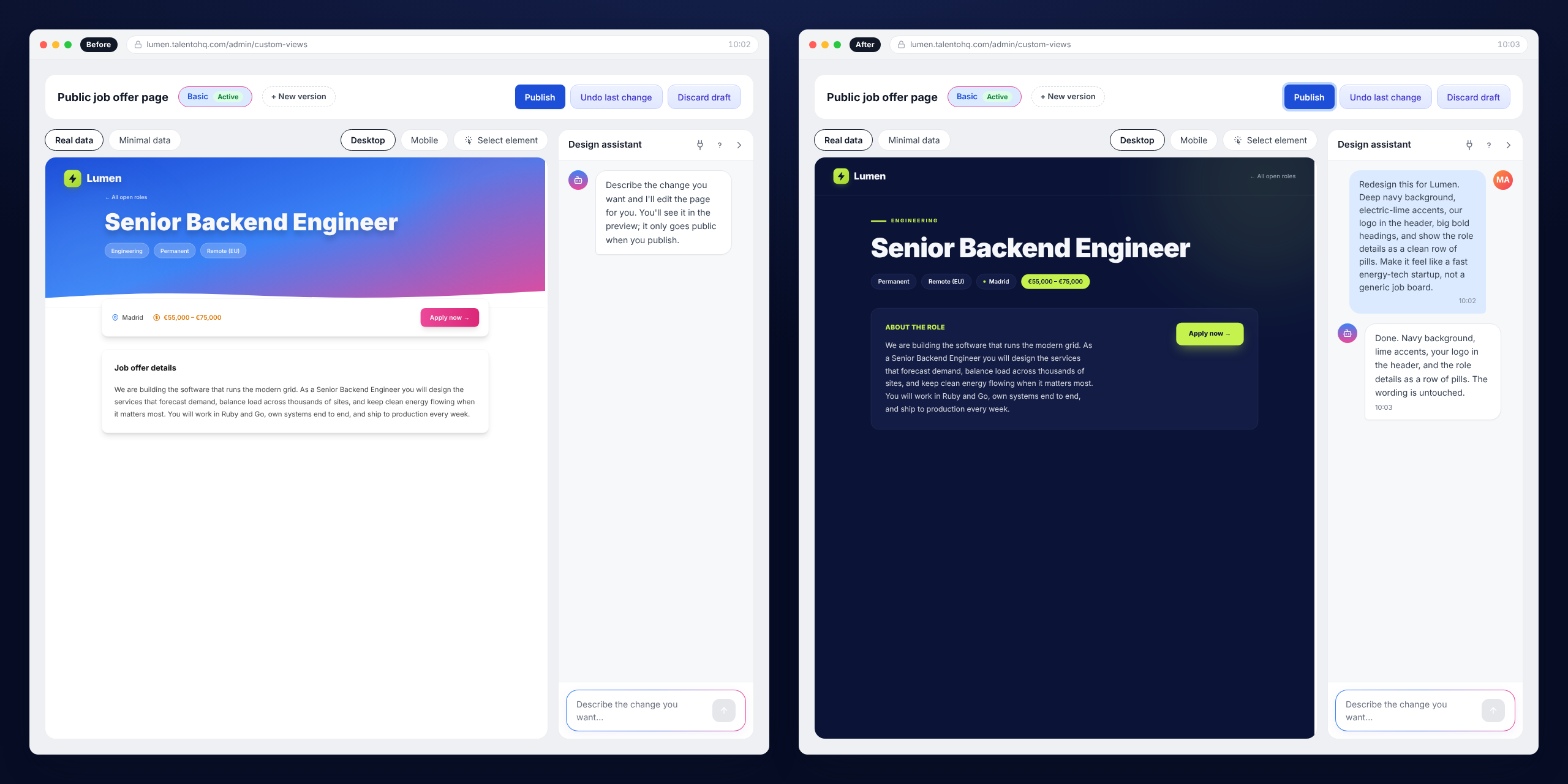
An admin opens the editor and sees their real job offer page, the live one, with their logo and their open roles. Next to it there is a chat. They type “make the header dark blue and add a short ‘why join us’ section under the description,” and the page changes in front of them. They click the title in the preview and say “this one in yellow,” and the title turns yellow. When it looks right, they publish.
They never see code. No HTML, no CSS, no idea what a token is. They describe a design and watch it happen.
We started with the public job offer page on purpose. It is one of the few pages our customers show to the outside world. It is not an internal dashboard their HR team stares at. It is the page a candidate reads before deciding whether to apply, the page that carries the company’s name to someone who does not work there yet. If any page is worth letting a company shape to its own identity, it is that one.
The two tools
Everything the model can do to a page runs through two tools. read_view returns the current document. edit_view changes it. That is the entire vocabulary. There is no “set the header color” tool and no “add a section” tool, nothing shaped around design at all. The model reads the page and rewrites small parts of it, the way you would in a text editor, and that small surface is the whole thing I had to get right.
Designing those two tools was not designing how a change gets applied. It was designing for a brilliant but unreliable collaborator. The model lies about having changed something when it changed nothing. It edits a version of the page it remembers from three messages ago instead of the one on screen. It tries to slip in a script, because the sites it learned from were full of them. And when something fails, its first instinct is to send the exact same thing again. Every rule in the tool is a concrete way the model goes wrong, and the tool is built so that the mistake is either impossible or fixes itself.
Start with drifting. The obvious tool takes a whole new document each turn and swaps it in. Give the model that tool and it wanders: you ask it to recolor a button and it rewrites a heading three sections away, because regenerating the page means re-deciding every line of it. It is also slow, since you pay to redraw the entire document for a one-line change, and it leaves no clean record of what actually changed, which means no real undo and no way to point at a single element later. So edit_view does not take a document. It takes a list of {old, new} pairs, the way most AI code tools have settled on editing, and each old has to appear in the document exactly once.
{ "old": "<span data-cv-token=\"title\" class=\"title\"></span>",
  "new": "<span data-cv-token=\"title\" class=\"title centered\"></span>" }
That “exactly once” is doing real work. If the old is not found, the model was editing from memory rather than from the page in front of it, so the edit is rejected. If it appears more than once, the change is ambiguous, so it is rejected too and the model is told to add surrounding context until the anchor is unique. The batch is atomic: if one replacement in it fails, none apply, and the document is never left half-edited. And after a successful edit the model gets the full updated document back, which becomes the only thing it is allowed to anchor the next edit to. Its own memory of the page is never the source of truth. The page is.
Then there is looping, which is how most agents fail. A failed edit could come back as a flat “error,” and the model would shrug and try the same thing again until it ran out of patience or I ran out of budget. So a failure is never just an error. It is one of two things that mean opposite things. A retry says the model made a fixable mistake, an anchor that did not match, a token name that does not exist, CSS that does not parse, and it should adjust and try again, but the retry has to change something, because resending the same call is not allowed. A hard_limit says the thing is impossible by policy, a script, an external URL, an iframe, and the model must not retry at all. Instead it explains the limit to the user in plain words and offers an alternative. The same wall produces two completely different behaviours, and the difference is the whole point: one says “try harder,” the other says “stop and tell the truth.”
The last failure is the quiet one: the model gets close and misses. Its anchor is almost right, off by a stray space or a character. A flat “not found” would send it guessing. So when an anchor does not match, the tool does not stop there. It runs a small fuzzy search over the document, finds the region nearest to what the model was reaching for, and hands it back: here is the closest real text, copy it exactly if this is what you meant. It is the same idea as a compiler suggesting the variable name you probably intended, except the reader is a model that needs to be walked back to what the document actually says.
None of this is a lot of code. It is a small set of decisions about what the two tools accept, what they refuse, and what they say when they refuse. But those decisions are most of why the thing works at all, and they were most of the work.
The editor around the chat
The chat is one panel. Around it is an editor built on a single belief: the person should never be afraid to try something. If experimenting is risky, nobody experiments, and a tool you only use carefully is not really a tool you can talk to.
So nothing is permanent until you say so. The model only ever edits a draft. Every time it makes a change, the state right before it is kept, and one button rolls back the last thing it did, the way undo works in any editor. If a whole conversation went the wrong way, you discard the draft and you are back to the page that is actually published. You can keep several versions side by side, name them, publish one, and roll back to a version you published before. The model never publishes. It cannot. Putting the page in front of the world is always a human pressing a button.
The preview is live, and it shows two versions of the page, not one. A job offer can be missing a salary, a category, a location, even a description. If you only ever design against a full offer, you ship a page that looks right for some roles and broken for others, with an empty grey box where a description should be. So the editor lets you flip the same design between a fully filled offer and one with the optional fields stripped out, and decide for yourself how it should behave when something is missing. Maybe you want the empty section to collapse. Maybe you are fine leaving it. That is your call to make, and the editor is where you see both before anyone outside does.
Point-and-edit is the part that feels closest to magic, and it is the smallest piece of code in the whole feature. You click an element in the preview, the composer remembers what you pointed at, and you say “this one in yellow” without naming it. The trick is that pointing carries no stored state. One walk over the page, in document order, numbers every element on the rendered preview. The same walk, run on the source document, resolves a number back to the matching element. Because both walks skip the same things, the third element on screen is the third element in the source, every time. A selection is just a position. There is no table of ids to keep, nothing to synchronise, nothing that goes stale when the page changes under it.
Put together, the editor is what makes talking to a model usable instead of nerve-wracking. The model is bold and occasionally wrong. The editor makes being wrong cheap.
The rails: a model writes HTML you serve in production
Stated plainly, the premise is uncomfortable. A model writes HTML and CSS, and you serve it on a public page to anyone on the internet. The page is safe because of how it is built, not because the model is trusted to behave.
The data is sealed off. The real values, the job title, the salary, the description, never reach the model. It only handles opaque tokens, placeholders it can move, wrap, style, duplicate, or delete, but never read and never fill in. It is told in words what each token holds so it can design around it, and nothing more. The logic is plain: if the model is never allowed to change a value, do not give it the chance to see it as changeable. That keeps a real value from leaking, and it keeps the model from inventing a field that does not exist.
Nothing executes. The HTML runs through an allowlist rather than a blocklist, so anything unfamiliar is dropped instead of waved through. No scripts, forms, iframes, event handlers, or inline styles. No raw links or images either; those exist only through tokens. SVG is allowed as plain paths, enough for an icon. It is sanitized twice with a re-parse in between, because one pass can miss markup that only shows up once a browser has touched it. The CSS is parsed into a tree and checked the same way, with no url() or expression() and nothing that can reach the network from a stylesheet. The published page then ships a Content-Security-Policy built from a hash of that exact compiled stylesheet, scripts disabled outright, the only styles the browser will run being the ones we compiled. If something got past every layer above it, the browser still would not run a line of script.
And it cannot take the page down. This was a rule from the start: the original page is always the fallback. If there is no published version, if we have thrown the global kill switch, or if rendering fails for any reason at all, the request falls back to the normal server-rendered page, drops the custom policy, and notifies us. It never returns an error. A page a model wrote does not get to break a recruiting page a company depends on.
You do not have to use our chat
This part says the most about where it is going. The editor has its own chat, but that is not the only way in. You can connect your own frontier agent, Claude Code, Codex, Cursor, Claude Desktop, ChatGPT, point it at the app, and redesign the page from there. One command pasted into your agent, and a minute later it edits the page through the same tools, behind the same guardrails, under the same rule that you publish and it does not.
It is the same idea one level up. The product should be reachable from any capable agent, not only the assistant we happen to ship. A model that already edits code can now edit a real public page in a real product, with the dangerous parts walled off. Giving frontier models a sanctioned, bounded way to act inside production software is the door I think LLMs are actually opening, and locking it to our own chat window felt like the wrong instinct.
Testing something that will not sit still
You cannot unit test “the page got nicer.” The system is non-deterministic on purpose, and the question I needed answered, whether my last change to a prompt or a tool made the model better or worse, is not something a passing test reports.
So I built a harness next to the feature while I was building the feature. It runs a set of scenarios against the real model and the real tools, no server in the loop, and records what happened: how many edits landed, how many retries it took, whether it hit a hard limit, whether the result still rendered for both a full and an empty offer, how many tokens it spent. When I changed a rule I could see the effect across every scenario instead of trying one example by hand and hoping. It turned “I think that is better” into something I could read off a page, which with a model in the loop is most of the work.
Where this goes
A year or two ago the work in front of me had a different shape, more forms and tables and code that did exactly what I told it to. Building something where I set the edges and let a model work inside them is new to me, and it is the most fun I have had in a while.
It is one page today. The machinery under it is not tied to job offers, and the hard parts, editing safely, keeping the human unafraid to experiment, sealing off the data, staying reachable from any agent, are already solved in a way that should carry to the next page and the one after. That is why it reads to me as a first step and not a finished thing.
I would like to hear what you think, whether you are building something similar, see a cleaner way to do any of this, or just have a thought. Always happy to talk.
Thank you for reading.