For the last several months we have had an AI chat running inside OfiHQ. It is not a support widget and it is not an autocomplete. It is an assistant that can look at your data, list your unpaid invoices, find a customer by name, draft a new expense, propose a project, all from a conversation. I want to walk through how it works, because the interesting part is not “we plugged in an LLM”. It is the set of decisions underneath that decide whether something like this lives or breaks in production.
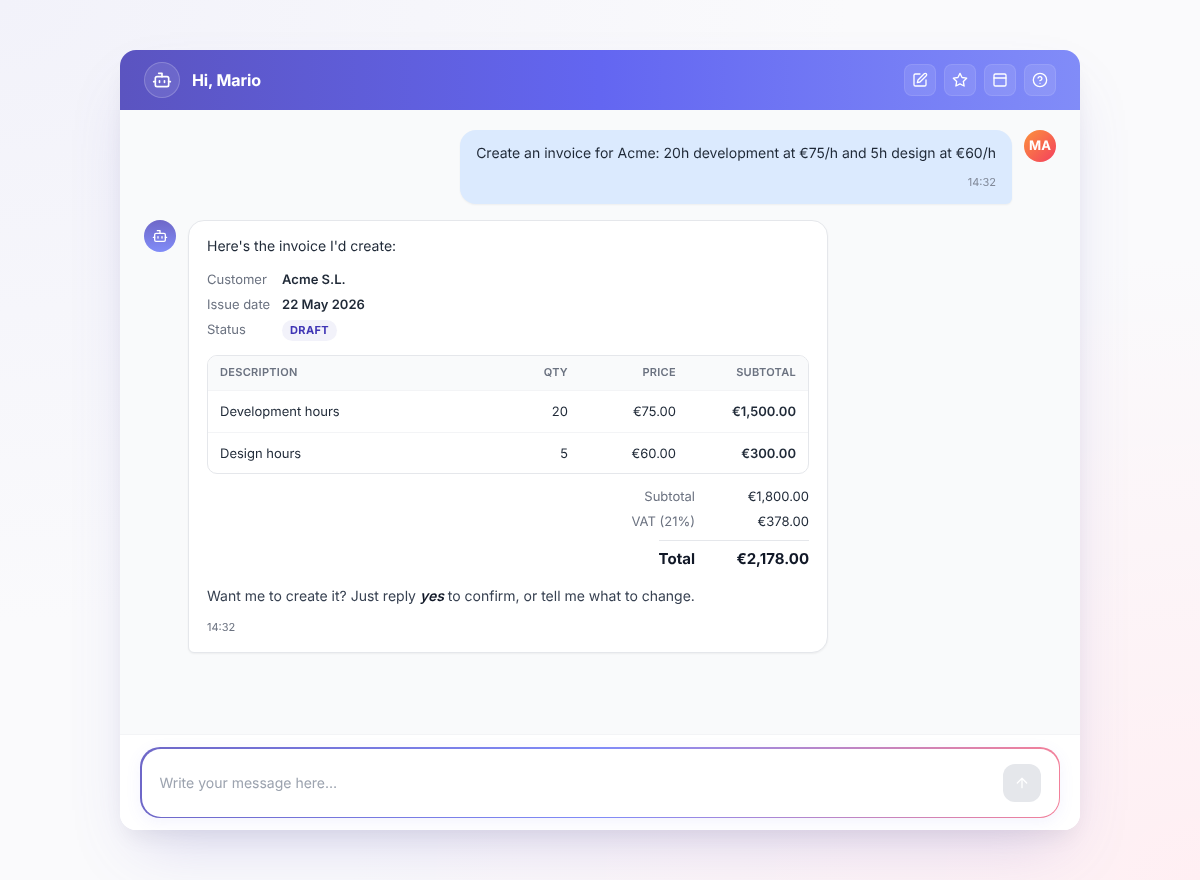
A real session, end to end: ask, preview, refine, confirm, follow up.
Why this kind of chat, not another one
Most chat features inside business apps today are support widgets on the marketing site. Useful, but ornamental. What we wanted was different. The application already stores everything important about a company: invoices, customers, expenses, projects, contracts, tasks… An assistant that can read that and act on it is not a gadget, it is the start of a different way of using the app. Less typing into forms, more describing what you want.
That was the bet. Months in, the cases we hear back from customers are the ones we expected: people pulling figures from several screens at once and asking for a conclusion, drafting an invoice in two sentences, checking what is outstanding without opening a report. The chat lets them move at the speed of asking.
What it looks like
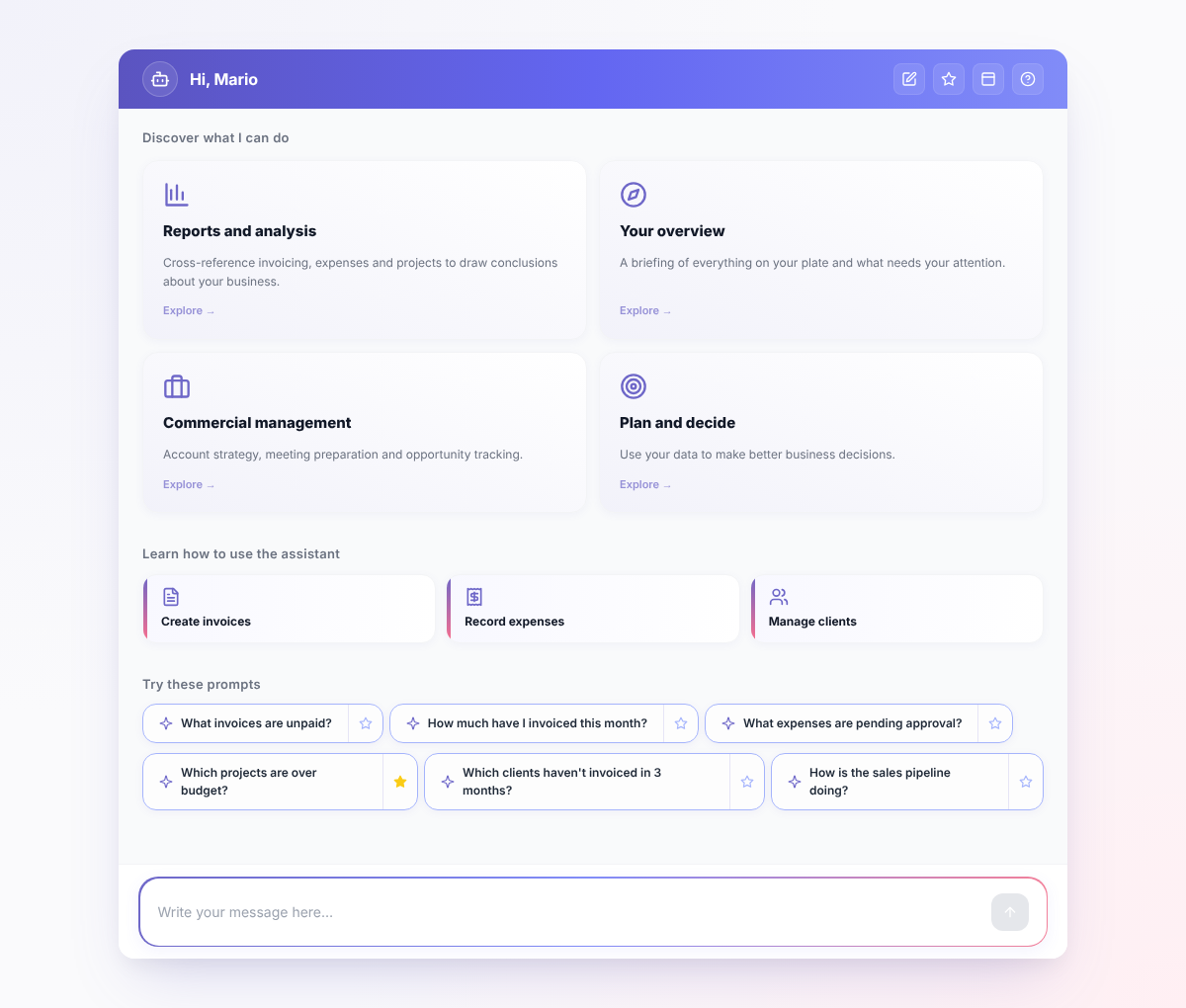
When you open the chat the first time you get a workspace of cards rather than a blank input. There are three kinds: capability tiles that open a short walkthrough of what the chat can do for an area of the app, help cards focused on specific tasks like creating an invoice or running a month-end review, and small chips with ready-made questions you can send with one click. They are picked at random from a larger pool so the chat feels fresh on different days, and they all disappear the moment you start typing. A blank chat is hard to discover. The cards make the first question almost write itself.
There is also a guide page that walks through what the chat can and cannot do, written in plain language and split by role. Both pieces exist for the same reason: an AI assistant has discovery problems that a button does not, and a UI that ignores that fails quietly.
How a language model ends up talking to your database
This is the part I find genuinely interesting, and it is where MCP comes in.
MCP, the Model Context Protocol, is the contract between a language model and the outside world. The model does not import your code, it speaks JSON over a transport and asks an MCP server for tools and resources. That is the abstraction. Once you accept it, the only design question left is where the MCP server lives.
In our case it lives inside the same Rails app. The chat does not talk to a microservice or a third party. The MCP endpoint is a regular controller mounted at /mcp, sitting next to every other controller, sharing the same models, the same policies, the same authentication stack. When the background job that streams the chat needs a tool, it instantiates an MCP client pointed at its own host, with an OAuth token it just minted. The client speaks the protocol, the server is us.
Why HTTP to yourself? Because the alternative is a private backdoor, and that is what you regret six months later, when a new developer cannot tell what the chat is allowed to do, or when you want to expose the same tools to another client like Claude Desktop. Going through the protocol turns the chat into one more consumer of an MCP server that anyone with the right credentials could call. No shortcut, no private wiring.
Credentials are the same OAuth we already use for our public API. The chat mints a token for the current employee on each turn, the server validates it like any other request, and every tool receives the resolved employee in its context. The chat is not a privileged caller. It is a regular user that happens to be a language model.
The loop, end to end, is short:
- The user sends a message. The controller persists it and enqueues a job.
- The job opens a streaming completion against the model with the list of tools the user’s role is allowed to use.
- When the model decides to call a tool, the MCP client makes an HTTP request to
/mcp. - The tool runs against the same Rails stack, returns a response, the model keeps generating.
- Each token of the answer streams back to the browser through Turbo.
Most of the work in this layer is the design above the code. The code itself stays small because the protocol does the heavy lifting.
What a tool actually looks like
A tool is a Ruby class. It declares a description, an input schema, and a call method. That is it.
class MCP::Tools::ListInvoices < MCP::Tool
  description "List invoices with filtering options." \
              "Use response_format to control detail level: " \
              "'concise' (default): customer, status, date, total, first item — for showing lists and answering questions. " \
              "'detailed': all fields including IDs — use ONLY when searching for specific data or need to immediately call edit_invoice. " \
              "Use 'company' to search by customer name (partial match, case-insensitive). " \
              "Use 'status' to filter: draft (not yet sent to customer), sent (delivered), rectified (corrected), cancelled. " \
              "Both start_date and end_date are optional — omit both to get all invoices regardless of date. " \
              "Draft invoices do not have an invoice number yet (assigned when sent)."

  input_schema(
    {
      type: "object",
      properties: {
        id: {
          type: "integer",
          description: "Filter by specific invoice ID to get a single invoice"
        },
        status: {
          type: "string",
          enum: %w[draft sent rectified cancelled],
          description: "Filter by invoice status. Omit to see ALL invoices (draft, sent, rectified, cancelled)."
        },
        company: {
          type: "string",
          description: "Search by customer/company name (partial match, case-insensitive)"
        },
        start_date: {
          type: "string",
          format: "date",
          description: "Filter invoices from this date onwards (YYYY-MM-DD). The current date is available in the system prompt. Optional — omit to have no lower bound."
        },
        end_date: {
          type: "string",
          format: "date",
          description: "Filter invoices up to this date (YYYY-MM-DD). Optional — omit to have no upper bound. Omit both start_date and end_date to get all invoices."
        },
        response_format: {
          type: "string",
          enum: %w[concise detailed],
          description: "Response detail level. 'concise' (default): key fields only, no IDs — use for showing lists and answering questions. 'detailed': all fields including IDs — use ONLY when searching for specific data or you need IDs for a follow-up edit/update call."
        }
      },
      additionalProperties: false
    }
  )

  class << self
    def call(**params)
      # 1. Resolves the current employee from server_context.
      #    Returns an error response if absent.
      #
      # 2. Filters through Invoices::Finder, the same finder the
      #    invoices index already uses, scoped to the employee.
      #
      # 3. Renders each invoice with MCP::Presenters::InvoiceResource
      #    (concise or detailed) and returns a Tool::Response.
      #
      # 4. Rescues unexpected errors and returns them as an error
      #    response so the model can surface the message to the user.
    end
  end
end
The interesting part of a tool is not the schema, it is the description. The description is the system prompt the model reads to decide whether the tool fits the question and how to call it. It took us several iterations to land on shapes like the one above. The line about draft invoices not having a number yet was added after watching the model apologise for missing data, or invent placeholder numbers, when in reality that was just how draft invoices work. The line about response_format was added after one tool call returned forty invoices in detailed mode and we watched the cost go up. The description carries that knowledge so we do not have to repeat it in the main system prompt.
The second thing worth pointing at is that there is a description on every property, not only at the top. That second layer is not redundant. The top-level description is what the model reads to decide whether this is the right tool. The per-property descriptions are what it reads when it is deciding what to pass. Same code, two different questions answered at two different moments.
The rest of the file is almost incidental. The tool does not invent business logic. Invoices::Finder already existed and is the same finder the rest of the app uses to render the invoices index. Tools are a thin wrapper over the service objects we have been writing for years. If a tool needs new logic, that logic belongs in the service, not in the tool. This keeps the surface area honest and the bugs in one place.
The result is rendered through a presenter, not dumped from the database. The model never sees invoice_id=4827. It sees F-2026-0091, Acme, 544.50 €, draft. Internal ids leak nothing useful to a conversation and waste tokens; readable identifiers do better work for both sides.
The shape of the response itself is part of the same idea. Early on, a list tool that returned zero rows after a permissions-scoped query confused the model badly. It could not tell empty-because-nothing-exists from empty-because-out-of-scope, and a model with no context fills the gap on its own. We saw it tell a user that their company had no invoices at all, when the truth was that there were plenty, just not any their role could see. The fix was not in the model, it was in the response: an empty result now comes back as a sentence that explains itself, not as an empty list. As a rule, anything the model would otherwise have to guess about a result, we put into the result.
The decisions that keep the user in control
The chat reads, but it also creates and edits. That is where it stops being a search box and starts being something you trust. A few choices made that part work.
No delete tools, ever. The chat cannot remove anything. Not invoices, not customers, not expenses. The decision is made at the level of the tool catalogue: if the tool does not exist, the model cannot call it. Prompt instructions are best effort, not shipping the capability is final. Confidence in an assistant is built over years and broken in a single deleted record, and we did not want to spend that capital.
Preview and confirm for everything that writes. Creation and edition tools do not write. They simulate the operation inside a transaction that gets rolled back, store the resulting preview in a short-lived cache keyed by id, and return that preview to the model. The model shows you what it is about to do, in full. Only when you say yes does a separate confirm_action tool fetch the preview from the cache and execute the real write. This is the single most important pattern in the system. It also took the most tuning: the model is naturally biased towards completing what it started, and getting it to stop reliably at the preview step required iterating on prompts and tool descriptions until the behaviour was boring.
Role-based access at the tool level and the query level. The list of tools a chat can call depends on who is asking. An employee gets fewer than a manager, and a manager fewer than an admin. Underneath, every query is scoped through the same policy objects the rest of the app already uses. The chat does not get its own private permissions, it inherits ours.
Looking at the three together, the same shape shows up: every responsibility we could pull out of the model and put into code, we did. The finders, the presenters, the previews, the role checks, the catalogue of tools that simply does not contain delete. The model writes the words. The code runs the rails. Paired with descriptions rich enough to teach the model what it is looking at, that is the whole trade-off behind this chat, and the work is mostly deciding which is which.
This first version is one we are happy with, but the trade-off is not settled. The model still carries more than it should on every turn: the full tool catalogue, a generous system prompt, context that is not always relevant to the question. The next iteration we are sketching splits the work in two. A small model reads the message and decides which tools, prompts and context to load, and a second one answers with a much narrower payload. We have other ideas in the queue too, like a judge model that reviews the answer before it reaches the user. None of them come free. They all add latency, cost, or both, and from here the question is as much where to spend that budget as it is what to move into code.
The stack
The piece that does the most work is ruby_llm, and it deserves more than a bullet point. It gives us a chat model that behaves like a normal Active Record (acts_as_chat, acts_as_message), with streaming, tool calls, multi-provider abstraction and persistence baked in. The complete method handles the loop: it talks to the model, surfaces tool calls, applies the response, and yields chunks back as they arrive. Swapping providers, wiring an MCP client, persisting every message and every tool call, all of it is one or two lines on our side because the gem already drew the right primitive. Most of the elegance of the chat code is on loan from ruby_llm. The companion gem, ruby_llm-mcp, is the MCP client we hand to complete, and it is what lets the model talk to our own /mcp endpoint without us writing a single line of protocol code.
The rest of the stack is short:
- Mistral by default. A European model for a European product. Customer data does not need to leave the continent for the chat to be useful, and that constraint matters more to our buyers than any benchmark.
- Provider per account. A customer can bring their own OpenAI, Anthropic, Gemini, DeepSeek or OpenRouter key. The setting is encrypted, and the chat builds a
RubyLLM.contextfor that account when it is set. - Streaming over Turbo Streams. No SSE wiring, no React. The job calls
broadcast_append_chunkfor every token and a small Stimulus controller renders markdown progressively in the browser. The output behaves the way users expect from a modern chat without leaving the Rails stack. - Append-only token tracking. Every assistant message records an
AiUsageEventwith input, output, cached and thinking tokens, plus the cost in USD micros for that model and provider. The table is immutable on purpose: cost data is the kind of thing you do not edit, you correct with a new entry.
Wrapping up
The chat has been in production for several months. The piece of feedback that stuck with me is the one from a user who had been opening three different screens every Monday to put together a summary, and who replaced the whole thing with a sentence. That is the shape of the value, and it is what I want more of.
The natural next problem, once you have a system like this, is how to make it better without breaking it. I wrote about that one in Building an evals harness for our AI assistant. The two posts go together.
If you are building something in this space, I would love to hear how you are approaching it. Always happy to compare notes.
Thank you for reading.